Windows 7 error 86

Windows 7 & Windows 2000  -  Error 86 when mapping drives.

One of my upgrades this week to Windows 7 was from a Windows XP laptop. Following  the steps I outlined in my previous post the initial process was a breeze!  No problems at all!!  Simple, some would say,  and as everything else goes as soon as “they” said it was simple…  Something will break!  That’s just how it is… If something seems easy, it will be easy!  Until you TELL someone it was easy, then all bets are off!

In this instance the thing that broke for me was some basic drive mapping…  This person  had a Windows 2000 machine still in use.  Lots of hard drive space shared,  printers shared… etc, etc.  Well, when this laptop was upgraded to Windows 7,  every attempt at mapping the shared drives would end in a “username & password error”.   Knowing that I was using the correct username and passwords (I had reset them a couple of times) I attempted to map the drives via the command line and that is where I saw another error.

ERROR 86 (network password incorrect)… hmm same problem only now it’s slightly better because I had an error number, Google, and Bing.  And, having those three things,  you can find the answer to anything. 8-)

Here’s what fixed the issue for my situation:

To solve this I needed to edit a Local Security Policy and set one of the entries to something other than “Not Defined” as it is on default.

First, enter the control panel, and in the top right, under ‘View by’ select ‘Large Icons’.  7-ctrl-panel
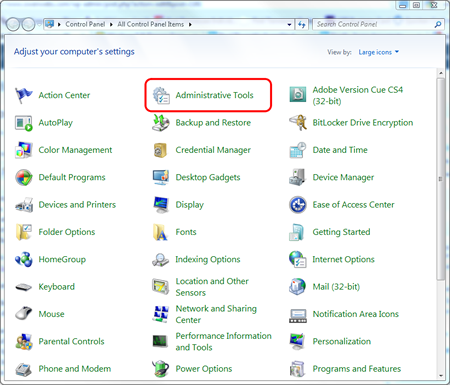
Then choose ‘Administrative Tools’, and then select ‘Local Security Policy.’
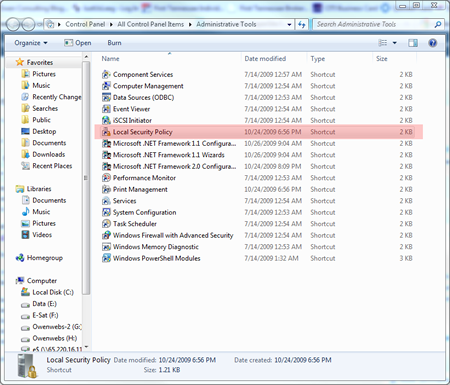
7-ctrl-2

A new window will appear and then choose ‘Local Policy’ on the left, then ‘Security Options’.
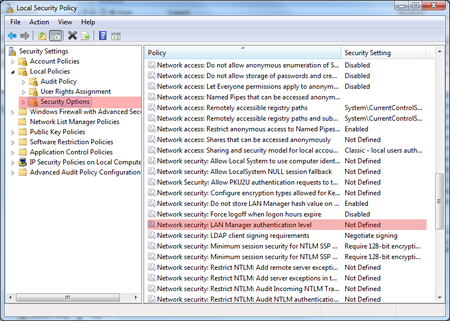
7-ctrl-3a

There will now be a large list of choices appear in the right window.  Scroll down and double click  Network Security: LAN Manager authentication level

A new window will oen. From the drop down menu select  Send LM & NTLM responses.  Then click the Apply button.
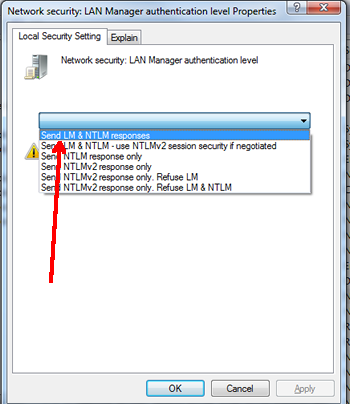
7-ctrl-4

Once I performed these steps,  I was able to map all  shared drives and Shared Printers on the Windows 2000 PC.

© 2009, Robert Owen. All rights reserved.

Related Posts Plugin for WordPress, Blogger...

Comments

  1. Worked for me when my Windows 7 PC lost the ability to access network shares on a Win2k server. Thanks!

  2. Sean Cameron says:

    Thanks, that’s some seriously useful information, and solves an issue that I was having connecting to a Win2K server.

  3. Thanks, this resolved an issue connecting to an xp workstation!

  4. Thanks a heap for this!

    WTF Microsoft?! What sort of default setting is that! I just love spending my time second guessing the decisions you make for me.

  5. Great, finally the solution. Thank

  6. Thanks!! this resolved my problem to connecting to an xp workstation!!!! :)

  7. on xp pro the apply button is ghosted out only ok button is available??????

  8. This is a great tip. I had this issue with a Terastation and always got this password error when trying to connect. Your solution solved the connection problem. +1 What was Microsoft thinking!?

  9. I’m not gay, but if i have you infront of me,….

    lot thank you.
    nice solution

  10. Great post, thanks for the help!

  11. Gracias, tenia 3 dias que no entraba en 2 maquinas y con esta solucion entre de inmediato.

    HRM

  12. Excellent, its working

  13. Hi. This works great for Windows 7 Enterprise but my problem is that i have a laptop with Windows 7 Home Premium and this OS has not the “Local Security Options” enabled so i cannot access the policies in order to change them. Any idea? Sorry for my broken english. Thanks.

  14. Luis Garcia says:

    Thank you so much for sharing this tip. It worked fine for Windows 7.
    Incredibly, My Laptop W7 worked fine yesterday. I could access to shared folders on a Windows 2000. This morning was no longer working. Windows Update had installed the KB2840149 security patch . I unistalled it and still did not work. I did the steps and it worked perfectly now.
    Tranks again.
    PS. sorry for my poor English.

Speak Your Mind

*

CommentLuv badge