Friday Funny: The Correct Answer?

September 11, 2009 by Robert Owen  
Filed under Friday Funnies

artHappy Friday everyone!  I Hope you week was good and I hope your weekend is glorious.  Looking for a good Friday Funny for today,  I found myself diving through the old e-mails again.   It was there that I found this lost Funny.  I think it may have been lost on purpose…    This one can get a bit tedious but if you hang on till the end, I think you’ll get a laugh.

Please note,  in this attempt at humor,  I only agree with the “Proper” answers and have never given thought to any of the alternate answers in any form… :lol:


Subject: the correct answer

The 5 questions most feared by men are:

  1. What are you thinking about?
  2. Do you love me?
  3. Do I look fat?
  4. Do you think she is prettier than me?
  5. What would you do if I died?

What makes these questions so difficult is that every one is guaranteed to explode into a major argument if the man answers incorrectly (i.e., tells the truth).   Therefore, as a public service, each question is analyzed below, along with possible responses.

Question # 1: What are you thinking about?

The proper answer to this, of course, is:   “I’m sorry if I’ve been pensive, dear.  I was just reflecting on what a warm, wonderful, thoughtful, caring, intelligent woman you are, and how lucky I am to have met you.”

This response obviously bears no resemblance to the true answer, which most likely is one of the following:

a. Baseball.
b. Football.
c. How fat you are.
d. How much prettier she is than you.
e. How I would spend the insurance money if you died.
f. Define thinking.

Perhaps the best response to this question was offered by Al Bundy, who once told Peg, “If I wanted you to know what I was thinking, I would be talking to you!”

Question # 2: Do you love me?

The proper response is:    “YES!” or,   if you feel a more detailed answer is in order,   “Yes, dear.”

Inappropriate responses include:

a. Oh Yeah, shit-loads.
b. Would it make you feel better if I said yes?
c. That depends on what you mean by love.
d. Does it matter?
e. Who, me?
f. Define love.

Question # 3: Do I look fat?

The correct answer is an emphatic:   “Of course not!”

Among the incorrect answers are:

a. Compared to what?
b. I wouldn’t call you fat, but you’re not exactly thin.
c. A little extra weight looks good on you.
d. I’ve seen fatter.
e. Could you repeat the question? I was just thinking about how I would spend the insurance money if you died.
f. Define fat.

Question # 4: Do you think she’s prettier than me?

Once again, the proper response is an emphatic:   “Of course not!”

Incorrect responses include:

a. Yes, but you have a better personality.
b. Not prettier, but definitely thinner.
c. Not as pretty as you when you were her age.
d. Define pretty.
e. Could you repeat the question? I was just thinking about how I would spend the insurance money if you died.

Question # 5: What would you do if I died?

A definite no-win question (the real answer, of course, is, “Buy a Corvette and a Boat”).   No matter how you answer this, be prepared for at least an hour of follow-up questions, usually along these lines:

WOMAN: Would you get married again?
MAN: Definitely not!
WOMAN: Why not, don’t you like being married?
MAN: Of course I do.
WOMAN: Then why wouldn’t you remarry?
MAN: Okay, I’d get married again.
WOMAN: You would (with a hurtful look on her face)?
MAN: (makes audible groan)
WOMAN: Would you sleep with her in our bed?
MAN: Where else would we sleep?
WOMAN: Would you put away my pictures, and replace them with pictures of her?
MAN: That would seem like the proper thing to do.
WOMAN: And would you let her use my golf clubs?
MAN: She can’t use them; she’s left-handed.
WOMAN: – - – silence – - –
MAN: Shit.

If you didn’t get the idea of all that mess above, then here is the same advice in musical form…

Possibly Related Posts:


Remote Shutdown, Oh how I love thee…

June 17, 2009 by Robert Owen  
Filed under MicroSoft, Software

I manage a few Windows Servers across my VPN… Updating software, OS, and managing backups, etc. And, sometimes when you are installing an update that requires a reboot things can get a little complicated. Especially, if that server has a lot of services running and you are logged in via Remote Desktop. If there a lot of services that have to be shut down, sometimes the server can hang in the process… Cutting your remote session but not finishing the reboot process.

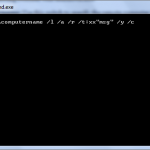
So… enter shutdown.exe. Shutdown.exe is a command line tool that can be used to shutdown and/or reboot local or remote servers. (Granted you have administrative privileges) You can use shutdown.exe two ways. By command line and the Graphic user inteface. If you want to try the command line approach, Shutdown.exe uses the following syntax:

shutdown \\computername /l /a /r /t:xxmsg” /y /c
.
command line activation
You can use the following switches with Shutdown.exe:
  • \\computername: Use this switch to specify the remote computer to shut down. If you omit this parameter, the local computer name is used.
  • /l (Note that this is a lowercase “L” character): Use this switch to shut down the local computer
  • /a: Use this switch to quit a shutdown operation. You can do this only during the time-out period. If you use this switch, all other parameters are ignored.
  • /r: Use this switch to restart the computer instead of fully shutting it down.
  • /t:xx: Use this switch to specify the time (in seconds) after which the computer is shut down. The default is 20 seconds.
  • msg: Use this switch to specify a message during the shutdown process. The maximum number of characters that the message can contain is 127.
  • /y: Use this switch to force a “yes” answer to all queries from the computer.
  • /c: Use this switch quit all running programs. If you use this switch, Windows forces all programs that are running to quit. The option to save any data that may have changed is ignored. This can result in data loss in any programs for which data is not previously saved.

Examples

  • To shut down the local computer in two minutes and display a “The computer is shutting down” message, use the following line in a batch file or type it at a command prompt, and then press ENTER:
    shutdown /l /t:120 “The computer is shutting down” /y /c

    To cancel the shutdown process, type the following line at the command prompt, and then press ENTER:

    shutdown /l /a /y
  • To shut down and restart a remote computer named “Support,” use the following line in a batch file or type it at a command prompt, and then press ENTER:
    shutdown \\support /r
  • To schedule the local computer to shutdown and restart at 10:00 P.M., type the following line at a command prompt, and then press ENTER:
    at 22:00 shutdown /l /r /y /c
  • To schedule the local computer to shutdown and restart at 6:00 P.M. every weekday, type the following line at a command prompt, and then press ENTER:
    at 18:00 /every:M,T,W,Th,F shutdown /l /r /y /c

Now you can also do the same thing with the Graphic interface. To activate the GUI Open a command prompt and type: shutdown /i you will then be presented with a window that will look like this:

shutdown gui

From the dropdown menus you can choose equivalent selection for the command line switches. Using this method to reboot the remote server takes the Remote Desktop out of the active services list and has been a great help in reliably rebooting the remote servers. This is a great help when you cannot get physically to the server Console and perform the reboot. This command line utility is present in Windows XP, Sever 2003, Windows Vista and Windows 7. I’ve not attempted this from a Server 2008 machine yet but, if it is not available there I will update you.

Possibly Related Posts: