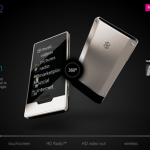
Pre-Order your ZuneHD!
August 13, 2009 by Robert Owen
Filed under Featured, Gadgets, Zune
The other Day Gizmodo and others leaked information about the official release date and prices for the new Zune HD. If you missed those posts here’s the “skinny”.
According to Microsoft the new Zune HD will officially be available starting September 15, 2009. Originally we thought the release date was set for September 5, then later we heard it had changed to late October or early November of this year. So, it’s good to have an Official Announcement on the date.
The new Zune HDs are priced at $219.99 for the 16 gigabyte version and $289.99 for the 32 gigabyte version. This is slightly less than the comparable iPod Touch models which are priced at $299 for the 16gb and $399 for the 32gb.
You can Pre-Order the new Zune by going to the Zune HD website and clicking the “Pre-order” link in the upper right hand corner.
Here is a recap of some features found on the new Zune HD.
- Organic light-emitting diode (OLED) touch screen.
16:9 widescreen format display (480 x 272 resolution) - High-definition (HD) video output capabilities.
- Built-in HD Radio receiver.
- Wi-Fi. “Zune HD is Wi-Fi enabled, allowing for instant streaming to the device from the more than 5 million-track Zune music store.”
- Internet browser. “Zune HD will include a full-screen Internet browser optimized for multitouch functionality.”
- 16GB and 32GB, Microsoft is considering adding a 64GB Zune later on in the model year.
- New Version of the Zune Software… Zune 4.0
Possibly Related Posts:
- Another Zune HD Hands-On Video
- New Zune HD Video
- Cool Video: Bird Attacks RC Plane
- Zune HD Video!
- Blackberry Going the way of the iPhone, Kinda.
New Start
March 14, 2009 by Robert Owen
Filed under Featured, General
This, I guess, can be tagged as my first “Official” entry… Getting ready to make some MAJOR changes to my main site:
and also to:
Well… In preparing for the new changes at the main site I though I would go ahead and work a version of the new banner into this Blog design.
I know no one is reading this but I’ll ask anyway… what do you think? Think it will work?
I know… most of you fictional readers are really asking what I have to blog about?!?! Well… I plan this to just be a catch all for my life and business… Sharing my coldfusion code finds, new virus fights(I just love fighting viruses), Web design updates, new projects, musical activities, and any other general thought that comes across my mind. So, enjoy… visit often… might get a prize if you do… Well, probably no prize but it might be interesting.
-Robert
Possibly Related Posts:
- Interesting Pay Scale
- Warranty Schmarranty
- Pecan Party :: Carnage
- Site of the Week: CouponKatie.com
- Site of the Week: Misc Bytes.com
Large Hadron Collider
February 28, 2009 by Robert Owen
Filed under Featured, Friday Funnies
CERN's Large Hadron Collider…
Info via Wikipedia:
The Large Hadron Collider (LHC) is the world's largest and highest-energy particle accelerator, intended to collide opposing particle beams, of either protons at an energy of 7 TeV/particle, or lead nuclei at an energy of 574 TeV/nucleus.
The Large Hadron Collider was built by the European Organization for Nuclear Research (CERN) with the intention of testing various predictions of high-energy physics, including the existence of the hypothesised Higgs boson and of the large family of new particles predicted by supersymmetry. It lies in a tunnel 27 kilometres (17 mi) in circumference, as much as 175 metres (570 ft) beneath the Franco-Swiss border near Geneva, Switzerland. It is funded by and built in collaboration with over 10,000 scientists and engineers from over 100 countries as well as hundreds of universities and laboratories.
On 10 September 2008, the proton beams were successfully circulated in the main ring of the LHC for the first time. On 19 September 2008, the operations were halted due to a serious fault between two superconducting bending magnets. Due to the resulting damage and additional safety features being added, the LHC is scheduled to be operational again no sooner than September 2009…
Make sense?
If not, give this a try:
How about now? No? At least it's more entertaining!
Possibly Related Posts:
- Friday Funny: Funny Pictures
- Friday Funny: Grandpa
- Friday Funnies: The Fun will Restart!
- Friday Funny: Cell Phone Games
- Friday Funny: How To Clean A Toilet
Unistall Norton Network Antivirus Without a Password
February 16, 2009 by Robert Owen
Filed under Featured, Software, Support
Here’s a quick “How-to”…
Symantec AntiVirus Clients, especially Corporate Edition Clients, can be installed remotely and managed via a Symantec AntiVirus Server. When a Symantec AntiVirus Client is managed, it prompts for password when you attempt to uninstall the client via local computer Control Panel Add or Remove Program applet. If you don’t know or have forgotten the password, then the client is not able to be uninstalled or removed.
In that case, (or when the Symantec AntiVirus server has been taken down and no longer exist, or the client computer has no access to company network, or the default client uninstall password does not work,) the following registry hack will enable you to remove Symantec Antivirus without using a password:
1. Open Registry Editor (regedit).
2. Navigate to the following registry key:
HKEY_LOCAL_MACHINESOFTWAREINTELLANDeskVirusPro tect6CurrentVersionAdministrator OnlySecurity
3. Change the value for useVPuninstallpassword key from 1 to 0.
4. Exit Registry Editor and now you can uninstall Symantec AntiVirus Client.
The trick should work on most version of Symantec or Norton AntiVirus client or Norton AntiVirus Client.
I think there is also a “Remove-All” Program you can download from the Symantec website however, I can’t find the link. I’ll keep looking and add it to this post when I locate it.
Possibly Related Posts:
- Create a Shortcut to open in your Alternate Browser
- My Latest Upgrade
- Scammers: They really need to try something new
- Warranty Schmarranty
- Windows 7 Telnet Client
PC Boots to Blinking Cursor
January 29, 2009 by Robert Owen
Filed under Featured, Support
This is more of a note for myself than anything… If I put it here, I will have an easier time finding what I did if/when I run across this problem again.
Had to reboot a working PC. No updates installed, no new software of any kind installed. It just simply locked up and needed a reboot. On reboot, after finishing the POST test, it went to a black DOS style screen with a blinking cursor in the upper left-hand corner.
This could mean several things:
- Corrupt Hard Drive
- Bad RAM
- Bad Motherboard
In this particular case, it was none of the above. What fixed, or appears to have fixed, the issue for me was pulling the power,removing the battery on the motherboard and resetting the CMOS. Letting it sit for a few minutes, I replaced the battery and reloaded the defaults in the BIOS. Then the PC booted fine.
So… there it is… As this is the simplest solution I will try this first next time.
Possibly Related Posts:
- Create a Shortcut to open in your Alternate Browser
- My Latest Upgrade
- Scammers: They really need to try something new
- Warranty Schmarranty
- Windows 7 Telnet Client
Xbox 360 Junkie?
January 19, 2009 by Robert Owen
Filed under Featured, MicroSoft, Xbox
Are you an Xbox live Junkie???
Love playing your games on-line?
Well, if you do then you will like this. I just read a tweet from @digitarius over at Twitter about this deal he found on Amazon. It appears that they have Xbox Live Gold memberships on sale.. Thirteen months for only $29.97!
So, hurry now while they last !
Possibly Related Posts:
- Create a Shortcut to open in your Alternate Browser
- My Latest Upgrade
- Windows 7 Telnet Client
- Windows 7 error 86
- Windows 7 Clean Install from Upgrade